EG254S: IoT System Project - IoT Network

Installing Additional Arduino Libraries
(Adapted from: https://www.arduino.cc/en/Guide/Libraries)
Before we proceed to installing additional Arduino libraries, refer to Using Arduino IDE.
There are three sketches (source codes) required for the Meshquitto setup:
1. The Mesh Gateway
2. The MQTT Gateway
3. The Meshquitto Node
Therefore, the sketches require additional Arduino libraries for them to compile successfully.
The Meshquitto network is created by making use of the painlessMesh libraries. So, we must first start by installing the painlessMesh libraries.
painlessMesh makes use of the following libraries, which can be installed through the Arduino Library Manager
· ArduinoJson
· TaskScheduler
· ESPAsyncTCP (ESP8266)
· AsyncTCP (ESP32)
Since, we’ll be using the ESP8266, we’ll not be installing the AsyncTCP library which is for ESP32.
How to Install the Libraries for PainlessMesh
Using the Library Manager
To install a new library into your Arduino IDE you can use the Library Manager. Open the IDE and click to the "Sketch" menu and then Include Library > Manage Libraries.
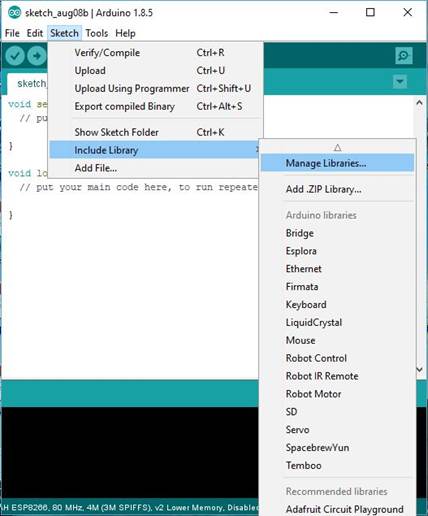
Then the Library Manager will open and you will find a list of libraries that are already installed or ready for installation. We will install the ArduinoJson library. Use the “Filter your search... ” to find it, click on it, then select the version of the library you want to install. Sometimes only one version of the library is available. If the version selection menu does not appear, don't worry: it is normal.
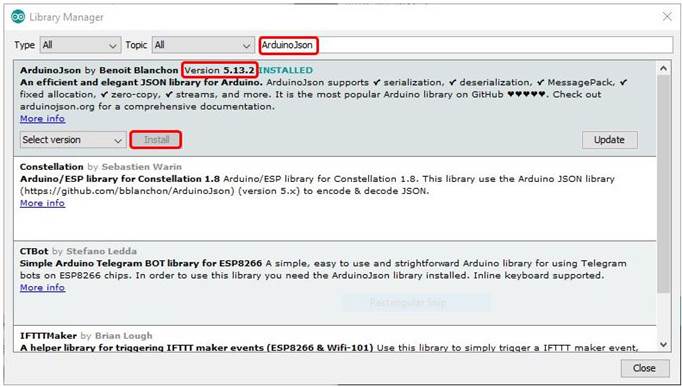
Finally click on install and wait for the IDE to install the new library. Downloading may take time depending on your connection speed. Once it has finished, an INSTALLED tag should appear next to the ArduinoJson library.
Note: Do not install the beta version of ArduinoJson. I had encountered issues when compiling the sketches.
Do the same for the TaskScheduler library using the Library Manager:
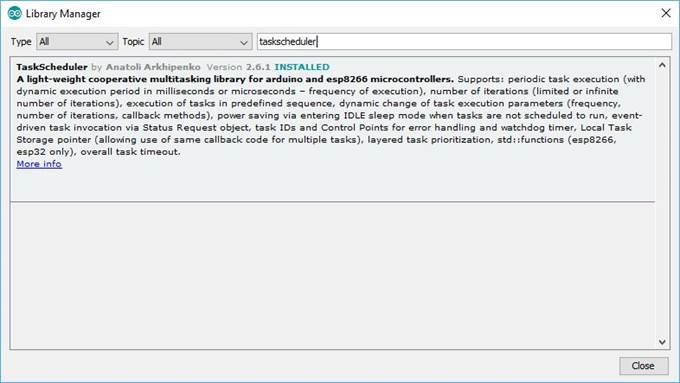
For the ESPAsyncTCP library, we cannot use the Library Manager (library not found). We need to import a .zip library.
Importing a .zip Library
Libraries are often distributed as a ZIP file or folder. The name of the folder is the name of the library. Inside the folder will be a .cpp file, a .h file and often a keywords.txt file, examples folder, and other files required by the library. Starting with version 1.0.5, you can install 3rd party libraries in the IDE. Do not unzip the downloaded library, leave it as is.
Let’s download the ESPAsyncTCP library zip file from https://github.com/me-no-dev/ESPAsyncTCP
Click on “Clone or download” and follow by “Download ZIP”.
In the Arduino IDE, navigate to Sketch > Include Library > Add .ZIP Library. At the top of the drop down list, select the option to "Add .ZIP Library''.
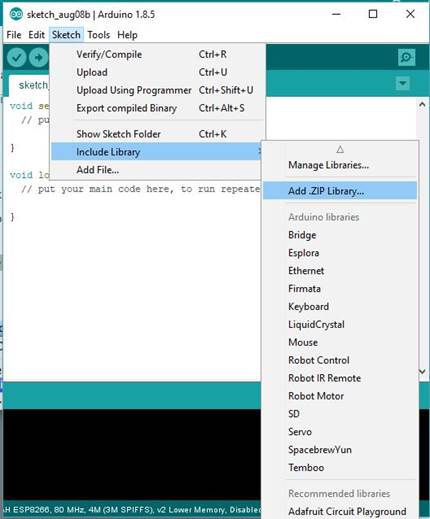
You will be prompted to select the library you would like to add. Navigate to the .zip file's location and open it.
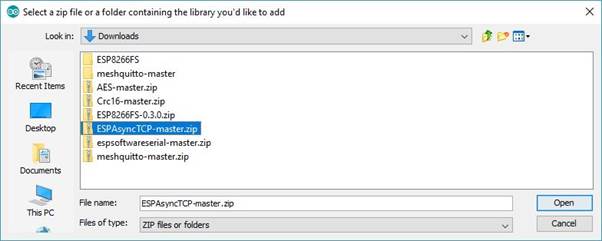
Return to the Sketch > Include Library menu. menu. You should now see the library at the bottom of the drop-down menu. It is ready to be used in your sketch. The zip file will have been expanded in the libraries folder in your Arduino sketches directory.
We have now installed the 3 libraries which the painlessMesh uses:
· ArduinoJson
· TaskScheduler
· ESPAsyncTCP (ESP8266)
Installing the Libraries for Meshquitto
The required libraries for the Meshquitto:
· EspSoftwareSerial
· Crc16
· AES
Communication between the MQTT gateway and Mesh gateway ESP8266 devices is achieved through Software serial. Since Software serial does not provide parity check functionality, CRC16 is used to detect transmission errors. AES encryption has been imported in order to add an extra security layer to messages passed between nodes in the mesh.
For the above 3 required libraries, we cannot use the Library Manager. So, we will import the .zip libraries.
Importing the .zip Libraries
Download the following libraries:
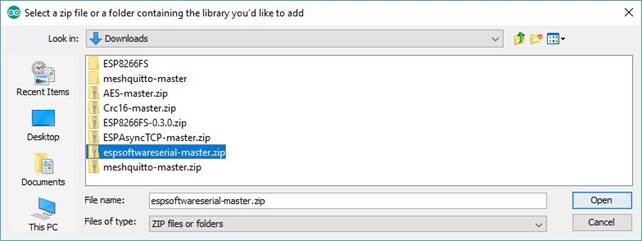
ü The EspSoftwareSerial library zip file from https://github.com/plerup/espsoftwareserial
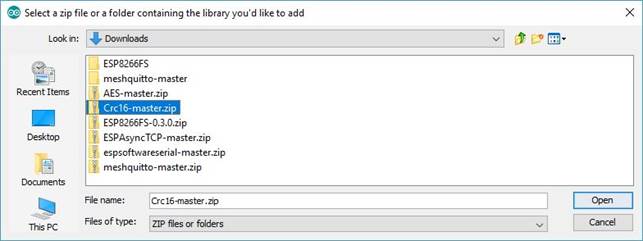
ü The Crc16 library zip file from https://github.com/vinmenn/Crc16
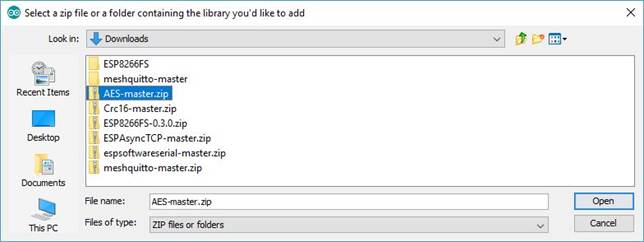
ü The AES library zip file from https://github.com/sglvladi/AES
Follow the above steps on Importing a .zip Library. Add the libraries after downloading them.
Add the EspSoftwareSerial library:
Add the Crc16 library:
Add the AES library:
After installing the above additional libraries for both the painlessMesh and the Meshquitto, we are ready for the three sketches (source codes) required for the Meshquitto setup:
1. The Mesh Gateway
2. The MQTT Gateway
3. The Meshquitto Node