EG254S: IoT System Project - Sensors

Grove – Touch Sensor
Grove - Touch Sensor enables you to replace press with touch. It can detect the change in capacitance when a finger is nearby. That means no matter your finger directly touches the pad or just stays close to the pad, Grove - Touch Sensor would outputs HIGH also.
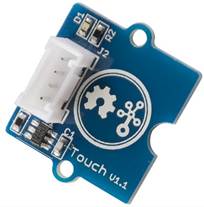 The
touch sensor is also referred as a capacitive touch sensor.
The
touch sensor is also referred as a capacitive touch sensor.
Specifications
- Operating Voltage: 2.0 - 5.5V
- Operating Current(Vcc=3V): 1.5 - 3.0μA
- Operating Current(VDD=3V): 3.5 - 7.0μA
- Output Response Time: 60 - 220mS
- Used Chipset: TTP223-BA6
The operating voltage range of 2.0 to 5.5V, thus allows it to work with ESP8266 controller which operates on 3.3V.
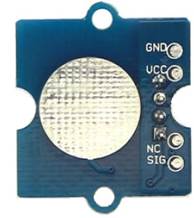 Capacitive Touch Sensor Pin Outs
|
Pin Name |
Description |
|
GND (Ground) |
This pin is connected to the Ground of the system. |
|
VCC (Power) |
The VCC pin powers the sensor, operating voltage: 2.0 – 5.5V |
|
NC |
Unused pin |
|
SIG (Signal) |
Output pin, emits active high signal when touched. Connects to a GPIO pin as input |
Applications
Capacitive touch sensing is a way of human touch sensing, that requires little or no force to activate. It may be used to sense human touch through more than a quarter of an inch of plastic, wood, ceramic or other insulating material (not any kind of metal though), enabling the sensor to be completely visually concealed.
A capacitive sensor covered with paper or other insulator also acts as fairly good (human touch) pressure sensor with an approximately logarithmic response. In this regard it may surpass force sensing resistors in some applications.
The touch sensor will be a great solution for the Rat Bait Station. It will be used to sense rat entry to the Rat Bait Station. When the touch is activated upon a rat entering, the ultrasonic sensor will be activated, and motion recorded.
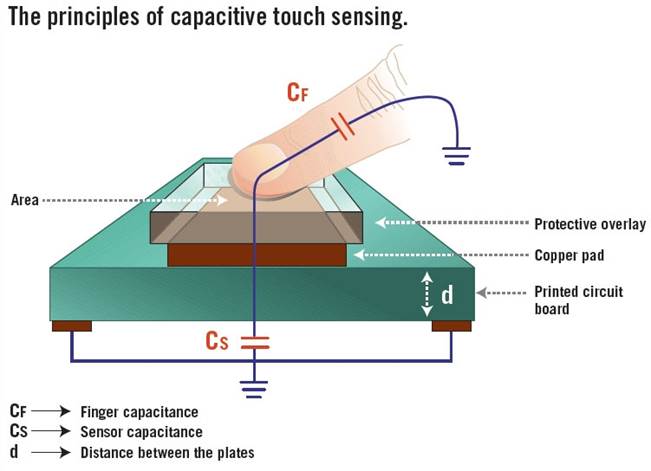
How it works
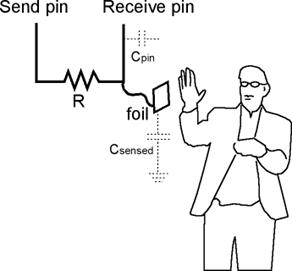 The sensor plate and your
body forms a capacitor. We know that a capacitor stores charge. The more its
capacitance, the more charge it can store.
The sensor plate and your
body forms a capacitor. We know that a capacitor stores charge. The more its
capacitance, the more charge it can store.
The capacitance of this capacitive touch sensor depends on how close your hand is to the plate.
Why Capacitive touch?
- Each touch sensor requires only one wire connected to it.
- Can be concealed under any nonmetallic material.
- Can be easily used in place of a button.
- Can detect a hand from a few inches away, if required.
- Very inexpensive.
References:
http://wiki.seeedstudio.com/Grove-Touch_Sensor/
https://www.instructables.com/id/How-To-Use-Touch-Sensors-With-Arduino/
https://playground.arduino.cc/Main/CapacitiveSensor?from=Main.CapSense