ET1530: Project - Week 8 - 10
Configuring Cisco ASA5510 Firewall
Configure the Cisco ASA5510 Firewall as per below:
Password:
ciscoasa# configure terminal
ciscoasa(config)# write erase !---Erases the startup configuration.
!---Loads the startup configuration and discards the running configuration without requiring a reload:
ciscoasa(config)# clear configure all
ciscoasa(config)# hostname pbil05
pbil05(config)# interface e0/1
pbil05(config-if)# nameif inside
INFO: Security level for "inside" set to 100 by default.
pbil05(config-if)# ip address 10.1.1.1 255.255.255.0
pbil05(config-if)# no shutdown !---To enable the interface.
pbil05(config-if)# exit
pbil05(config)# interface e0/0
pbil05(config-if)# nameif outside
INFO: Security level for "outside" set to 0 by default.
pbil05(config-if)# ip address 192.168.168.5
pbil05(config-if)# no shutdown !---To enable the interface.
pbil05(config-if)# exit
pbil05(config)# interface e0/2
pbil05(config-if)# nameif dmz
pbil05(config-if)# security-level 50
pbil05(config-if)# ip address 10.1.2.1 255.255.255.248
pbil05(config-if)# no shutdown !---To enable the interface.
pbil05(config-if)# exit
pbil05(config)# global (outside) 1 39.0.5.3-39.0.5.13
pbil05(config)# global (outside) 1 39.0.5.14
pbil05(config)# nat (inside) 1 0.0.0.0 0.0.0.0
pbil05(config)# clear xlate
pbil05(config)# route outside 0.0.0.0 0.0.0.0 192.168.168.1
!--- This network static does not use address translation.
!--- Inside hosts appear on the DMZ with their own addresses.
pbil05(config)# static (inside,dmz) 10.1.1.0 10.1.1.0 netmask 255.255.255.0
The static command provides a global address of 39.0.5.1 for the DNS server at 10.1.2.2.
!--- This network static uses address translation.
!--- Hosts accessing the DNS server from the outside use the 39.0.5.1 address.
pbil05(config)# static (dmz,outside) 39.0.5.1 10.1.2.2 netmask 255.255.255.255
The static command provides a global address of 39.0.5.2 for the web server at 10.1.2.3.
!--- This network static uses address translation.
!--- Hosts accessing the Web server from the outside use the 39.0.5.2 address.
pbil05(config)# static (dmz,outside) 39.0.5.2 10.1.2.3 netmask 255.255.255.255
To understand NAT and ACL, we take a look at the configuration for an untrusted host from the outside accessing our web server in the DMZ through the firewall:
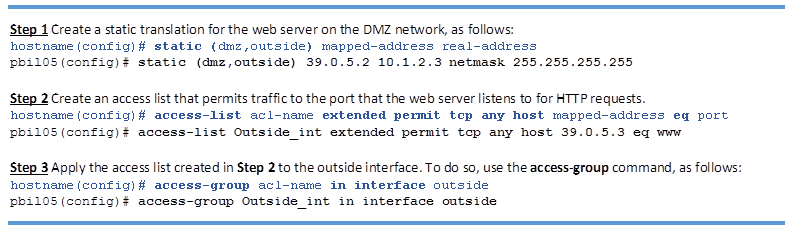
OUTSIDE to DMZ
Allow the DNS traffic: Open the port udp and tcp 53 in order to allow the hosts from the outside (Internet) to access the DNS server (secure) placed in the DMZ network.
!--- This access list allows hosts to access IP address 39.0.5.1 for the DNS port.
pbil05(config)# access-list Outside_int extended permit udp any host 39.0.5.1 eq 53
pbil05(config)# access-list Outside_int extended permit tcp any host 39.0.5.1 eq 53
Open the HTTP port and HTTPS port traffic: Open the port tcp 80 and 443 in order to allow the hosts from the outside (Internet) to access the web server (secure) placed in the DMZ network.
The access-list command lets any host access the global address using port 80 and 443.
!--- This access list allows hosts to access IP address 39.0.5.2 for the HTTP port.
pbil05(config)# access-list Outside_int extended permit tcp any host 39.0.5.2 eq 80
!--- This access list allows hosts to access IP address 39.0.5.2 for the HTTPS port.
pbil05(config)# access-list Outside_int extended permit tcp any host 39.0.5.2 eq 443
!--- This access list allows ICMP to access.
pbil05(config)# access-list Outside_int extended permit icmp any any echo-reply
pbil05(config)# access-list Outside_int extended permit icmp any host 39.0.5.1 echo
pbil05(config)# access-list Outside_int extended permit icmp any host 39.0.5.2 echo
The access-group command specifies that the access-list command applies to traffic entering the outside interface.
pbil05(config)# access-group Outside_int in interface outside
DMZ to INSIDE
In order to allow communication from the DMZ to internal network hosts, use these commands.
!--- Allows outgoing DNS connections. This access list allows host IP address 10.1.2.2
!--- sourcing the DNS port to access any host on higher security level.
pbil05(config)# access-list DMZ_int extended permit udp host 10.1.2.2 any eq domain
pbil05(config)# access-list DMZ_int extended permit tcp host 10.1.2.2 any eq domain
!--- Allows outgoing HTTP and HTTPS connections. This access list allows host IP address 10.1.2.3
!--- sourcing the HTTP port and the HTTPS port to access any host on higher security level.
pbil05(config)# access-list DMZ_int extended permit tcp host 10.1.2.3 any eq 80
pbil05(config)# access-list DMZ_int extended permit tcp host 10.1.2.3 any eq 443
!--- Allows outgoing FTP connections. This access list permit outbound FTP control traffic host
!--- IP address 10.1.2.3 sourcing the FTP port to access the inside host.
pbil05(config)# access-list DMZ_int extended permit tcp host 10.1.2.3 10.1.1.0 255.255.255.0 eq ftp
!--- Allows outgoing SFTP connections. This access list permit outbound SFTP data traffic host
!--- IP address 10.1.2.3 sourcing the FTP-data port to access the inside host.
pbil05(config)# access-list DMZ_int extended permit tcp host 10.1.2.3 10.1.1.0 255.255.255.0 eq 23450
!--- Apply the access list created to the DMZ interface using the access-group command.
pbil05(config)# access-group DMZ_int in interface dmz
Finally, we copy the running configuration to the startup configuration
pbil05(config)# copy running-config startup-config
Setup Remote Access via SSH
Create a new user and the login password for remote access via Telnet or SSH:
pbil05(config)# username administrator password pass123
pbil05(config)# aaa authentication ssh console LOCAL
To generate RSA keys for SSH:
pbil05(config)# crypto key generate rsa modulus 1024
Set to allow 10.1.1.2 to access the ASA on the inside interface:
pbil05(config)# ssh 10.1.1.2 255.255.255.255 inside
pbil05(config)# ssh version 2
pbil05(config)# copy running-config startup-config
Setup Logging
To enable logging in general on the firewall.:
pbil05(config)# logging on
To transmit syslog messages to the syslog server.:
pbil05(config)# logging host inside 10.1.1.2
pbil05(config)# logging trap 5
Saving Configuration to File
Save to a TFTP server, enter the following command:
pbil05(config)# copy running-config tftp://10.1.1.2/startup.cfg
Copy the startup File to the startup configuration from a TFTP server:
pbil05(config)# copy tftp://10.1.1.2/startup.cfg startup-config
pbil05(config)# copy startup-config running-config