ET1530: Project - Week 5 - 7
Configuring DNS Server placed in DMZ
(Adapted from: DNS and BIND 4th Edition by Paul Albitz & Cricket Liu)
The Domain Name System is basically a database of host information. The service DNS provides is information about internet hosts.
Address and Alias Records
We create the name-to-address mappings. We add the following resource records to the db.pbil05.lab file:
;
; Host addresses
;
localhost.pbil05.lab. IN A 127.0.0.1
ns.pbil05.lab. IN A 10.1.2.2
pbil05.lab. IN A 10.1.2.3
files.pbil05.lab. IN A 10.1.2.3
;
; Multi-homed hosts
;
asa.pbil05.lab. IN A 10.1.1.1
asa.pbil05.lab. IN A 10.1.2.1
;
; Aliases
;
www.pbil05.lab. IN CNAME pbil05.lab.
inside.pbil05.lab. IN A 10.1.1.1
dmz.pbil05.lab. IN A 10.1.2.1
The A stands for address and each resource record maps a name to an address. asa.pbil05.lab is the Cisco ASA 5510 firewall. It has two addresses associated with its name and therefore two address records. A DNS lookup can return more than one address for a name; a lookup of asa.pbil05.lab returns two.
The final two entries solve a special problem. Suppose we want to check one of the interfaces of the Cisco ASA 5510 firewall. One common troubleshooting technique is to ping the interface to verify that it is responding. If we ping the name asa.pbil05.lab, the name server returns both addresses for the name. ping uses the first address in the list. But which address is first? We choose the address we want by using either inside.pbil05.lab or dmz.pbil05.lab; each name referred to one of the host’s addresses. Now, to check the operation of the 10.1.2.1 interface on asa.pbil05.lab, we ping dmz.pbil05.lab since it refers to only one address. The same applies to inside.pbil05.lab.
PTR Records
Next we create the address-to-name mappings. The file db.10.1.2 maps addresses to host names for the 10.1.2.0/28 network. The DNS resource records used for this mapping are PTR (pointer) records. There is one record for each network interface on this network.
Here are the PTR records we added for network 10.1.2.0/28:
1.2.1.10.in-addr.arpa. IN PTR asa.pbil05.lab.
2.2.1.10.in-addr.arpa. IN PTR ns.pbil05.lab.
3.2.1.10.in-addr.arpa. IN PTR pbil05.lab.
3.2.1.10.in-addr.arpa. IN PTR files.pbil05.lab.
We created similar data for the 10.1.1.0/24 network:
1.1.1.10.in-addr.arpa. IN PTR asa.pbil05.lab.
Setting Up a BIND Configuration File
Now that we’ve created the zone data files, a name server must be instructed to read each of the files. For BIND, the mechanism for pointing the server to its zone data files is the configuration file.
In BIND 9, it’s in etc/bind/named.conf.local.
Forwarding
A primary master or slave name server’s mode of operation changes slightly when it is configured to use a forwarder. If a resolver requests records that are already in the name server’s authoritative data or cached data, the name server answers with that information; this part of its operation hasn’t changed. However, if the records aren’t in its database, the name server sends the query to a forwarder and waits a short period for an answer before resuming normal operation and contacting the remote name servers itself. What the name server is doing differently here is sending a recursive query to the forwarder, expecting it to find the answer. At all other times, the name server sends out nonrecursive queries to other name servers and deals with responses that only refer it to other name servers.
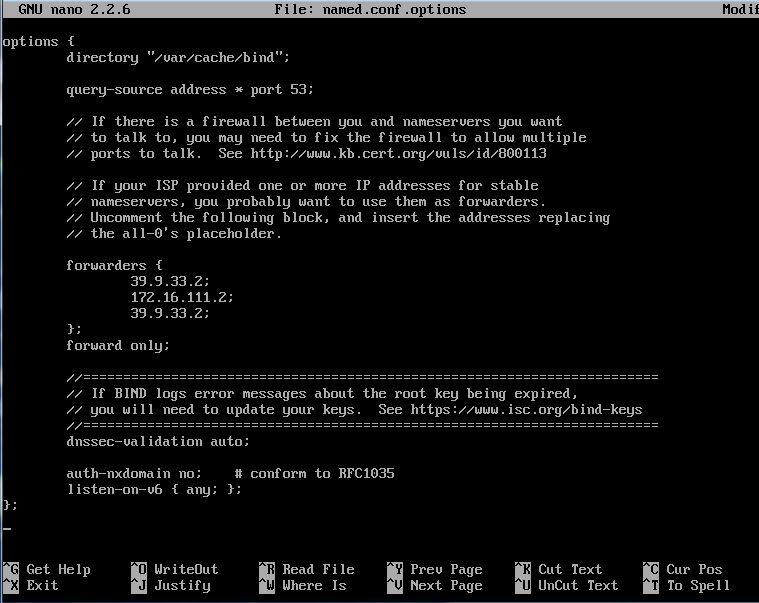
We use the ISP DNS server 39.9.33.2 as a forwarder so that we can look up Internet domain names. We add this forwarders substatement to /etc/bind/named.conf.options:
options {
forwarders { 39.9.33.2; };
};
A More Restricted Name Server
We may want to restrict our name server even further – stopping it from even trying to contact an off-site server if our forwarder is down or doesn’t respond. We can do this by configuring our name server to use forward-only mode. A name server in forward-only mode is a variation on a name server that uses forwarders. It still answers queries from its authoritative data and cached data. However, it relies completely on its forwarders; it doesn’t try to contact other name servers to find information if the forwarders don’t give it an answer.
Here is the configuration file of a name server in forward-only mode would contain:
options {
forwarders { 39.9.33.2; };
forward only;
};
Two Name Servers in One using Views
BIND 9 introduced views, another mechanism that’s very useful in firewalled environments. Views allow us to present one name server configuration to one community of hosts and a different configuration to another community. This is particularly handy since we’re running a name server on a host in DMZ that receives queries from both our internal hosts and hosts on the Internet.
If we don’t configure any views, BIND 9 automatically creates a single, implicit view that it shows to all hosts that query it. To explicitly create a view, we use the view statement, which takes the name of the view as an argument:
view “inside” {
};
We select which hosts “see” a particular view using the match-clients view substatement, which takes an address match list as an argument. If we don’t specify a community of hosts with match-clients, the view applies to all hosts.
We create a view visible only to hosts on the inside 10.1.1.0/24:
view “inside” {
match-clients { 10.1.1.0/24; };
};
Here’s the full /etc/bind/named.conf.local file:
view “inside” { // internal view of our zones
match-clients { 10.1.1.0/24; };
recursion yes;
zone “pbil05.lab” {
type master;
file “/etc/bind/inside/db.pbil05.lab”;
};
zone “1.1.10.in-addr.arpa” {
type master;
file “/etc/bind/inside/db.10.1.1”;
};
};
view “outside” { // view of our zones for the rest of the world
match-clients { any; }; // implicit
recursion no; // outside of our subnet, they shouldn’t be
// requesting recursion
zone “pbil05.lab” {
type master;
file “/etc/bind/outside/db.pbil05.lab”;
};
zone “5.0.39.in-addr.arpa” {
type master;
file “/etc/bind/outside/db.39.0.5”;
};
};
The final completed /etc/bind/named.conf.local file:
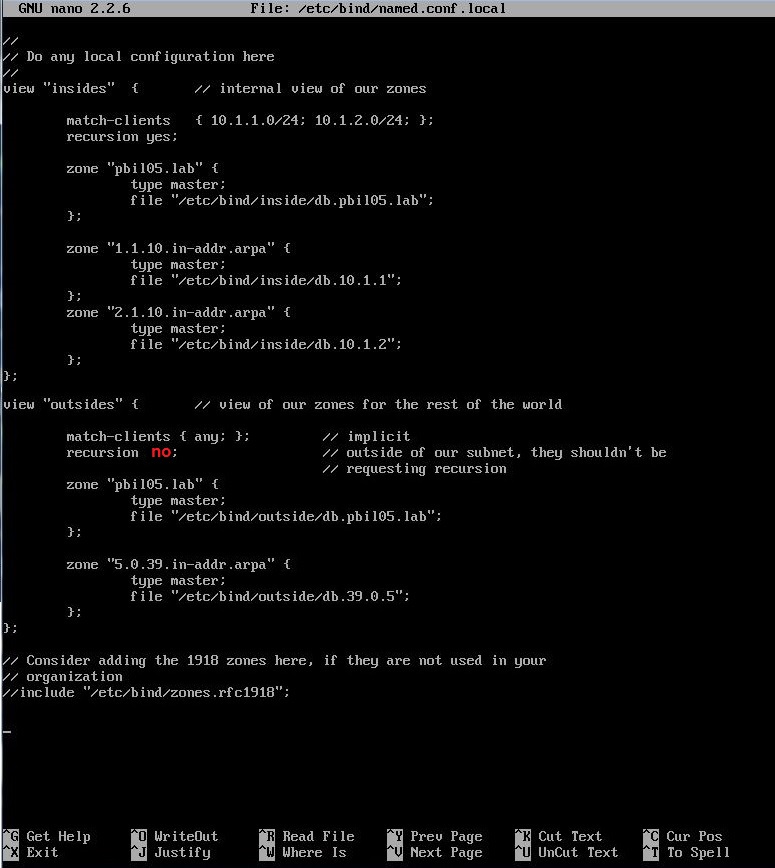
Note: We need to place all zone files in view. Hence, we configure the /etc/bind/named.conf.default-zones file:
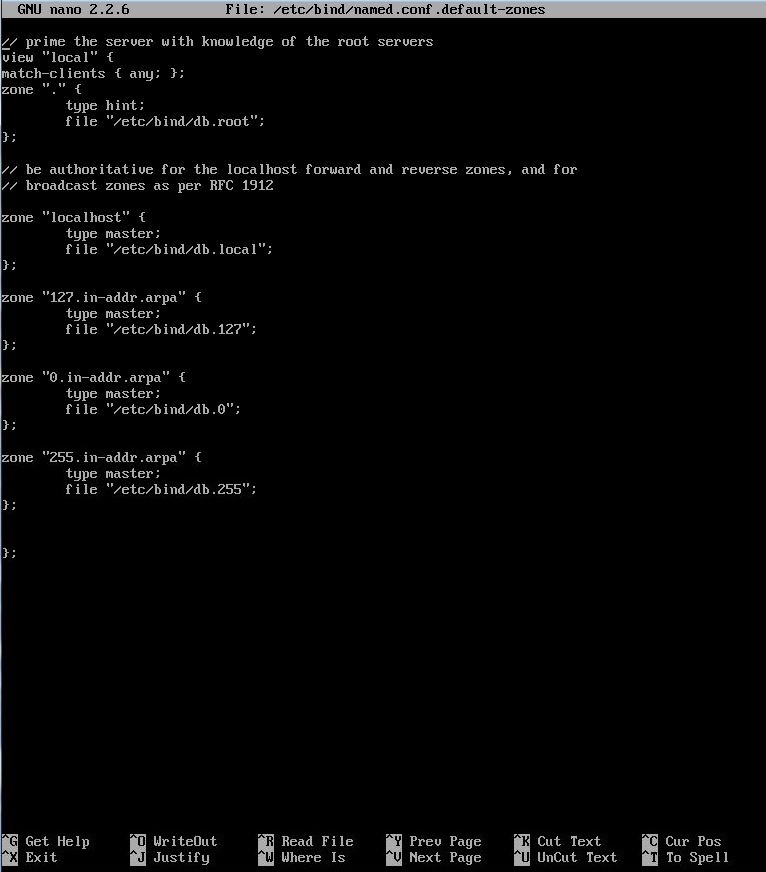
The match clients configuration directive allow us to conditionally show that view based on a set of IPs, "any" stands for any IP. Internal IPs will be cached by the ‘insides’ view and the rest will be dropped on the ‘outsides’ view. The outside world can't see the ‘insides’ view, but we removed the allow-transfer from the ‘insides’ view since we don't want anyone to be able to transfer under any circumstances the contents of the ‘insides’ view.
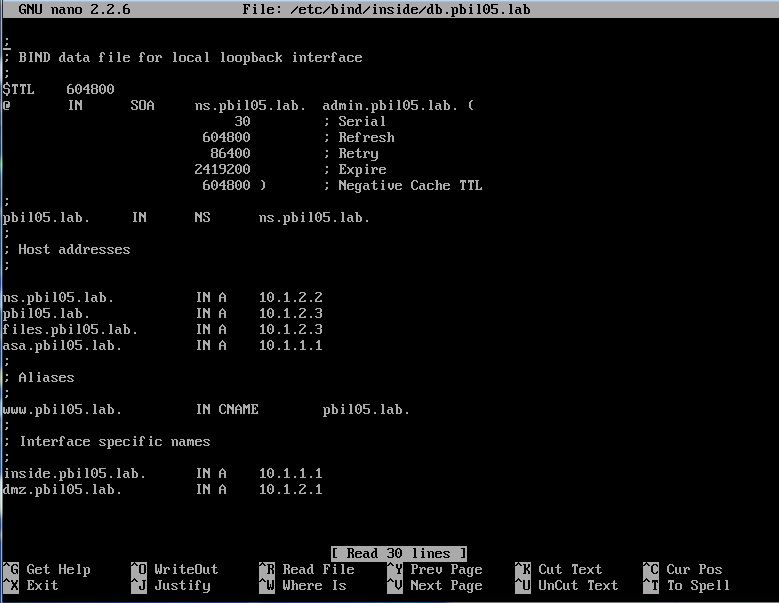
We also changed the path, we will have to create the directory /etc/bind/inside and /etc/bind/outside and move /etc/bind/db.pbil05.lab to /etc/bind/outside/.
On /etc/bind/inside/db.pbil05.lab we put a zone file similar to the counterpart on outsides but holding the internal IPs:
The Completed Zone Data Files
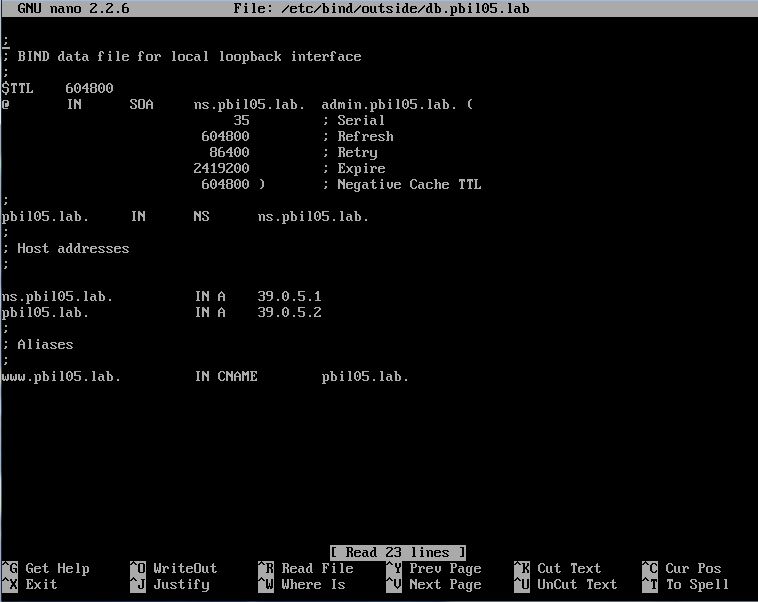
Here are the contents of the file /etc/bind/outside/db.pbil05.lab:
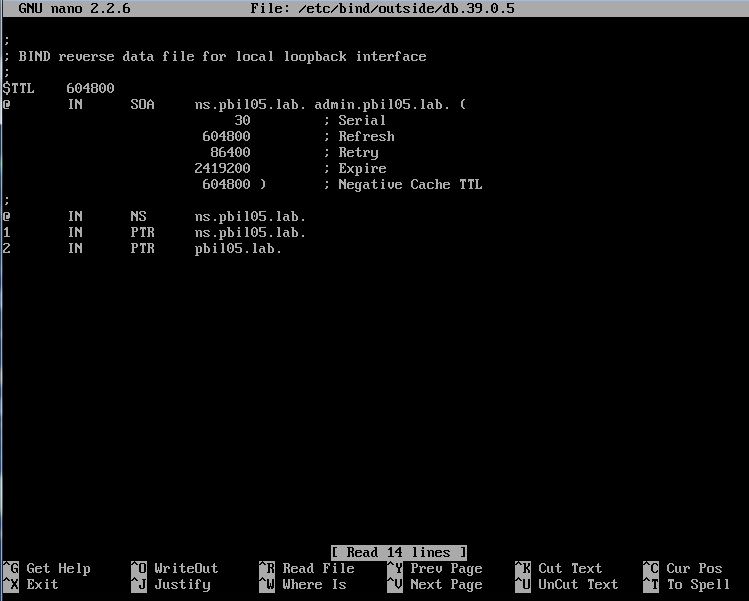
Here are the contents of the file /etc/bind/outside/db.39.0.5:
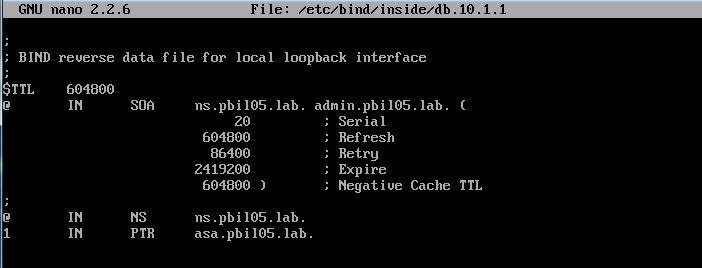
Here are the contents of the file /etc/bind/inside/db.10.1.1:
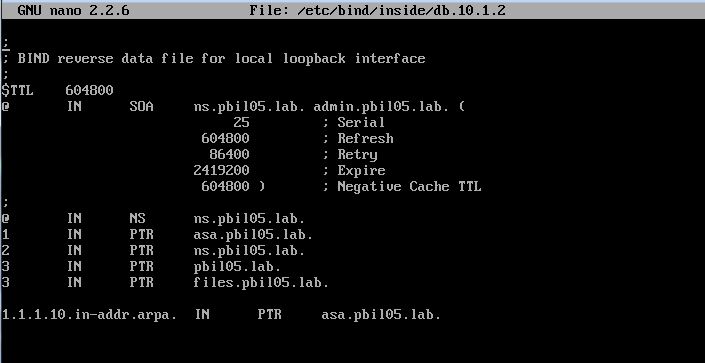
Here are the contents of the file /etc/bind/inside/db.10.1.2:
The Loopback Address
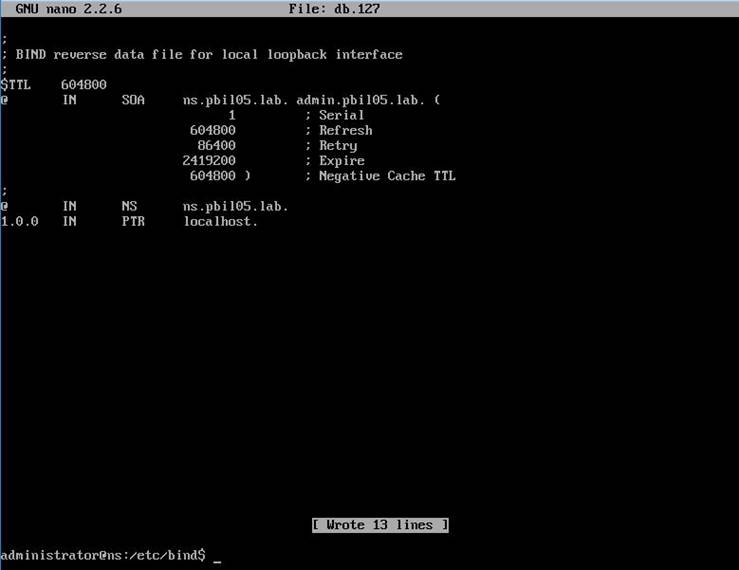
A name server needs one additional db.ADDR file to cover the loopback network: the special address that hosts use to direct traffic to themselves. This network is (almost) always 127.0.0/24, and the host number is (almost) always 127.0.0.1. Therefore, the name of this file is db.127. No surprise here; it looks like the other db.ADDR files.
Here are the contents of the file db.127:
A Gotcha with BIND 9 and Packet-Filtering Firewalls
BIND 9 name servers don’t send queries from port 53 by default. Instead, they send queries from high-numbered ports, the same as resolvers do. This can cause problems with packet-filtering firewalls that are configured to allow name server-to-name server traffic but not resolver-to-name server traffic, because they typically expect name server-to-name server traffic to originate from port 53 and terminate at port 53.
To solve this problem, we configure BIND to revert to its old behavior with the query-source substatement. query-source takes as arguments an address specification and an optional port number.
We add this query-source substatement to /etc/bind/named.conf.options:
options {
query-source address * port 53;
};
This tells BIND to use port 53 as the source port for queries sent from all local network interfaces.
Preventing Unauthorised Zone Transfers
Arguably even more important than controlling who can query our name server is ensuring that only our real slave name servers can transfer zones from our name server. Users on remote hosts that can query our name server’s zone data can only look up records (e.g., addresses) for domain names they already know, one at a time. Users who can start zone transfers from our server can list all of the records in our zones.
BIND 9’s allow-transfer substatement let administrators apply an access control list to zone transfers. allow-transfer restricts transfers of a particular zone when used as a zone substatement, and restricts all zone transfers when used as an options substatement. It takes an address match list as an argument.
Since we didn’t set up any slave name servers, we shall apply a global access control list to zone transfers. We do not allow any zone transfers by adding this allow-transfer substatement to /etc/bind/named.conf.options:
options {
allow-transfer { none; };
};