ET1530: Project - Week 4 - 5
Dynamic Host Configuration Protocol (DHCP)
(Adapted from: https://help.ubuntu.com)
The Dynamic Host Configuration Protocol (DHCP) is a network service that enables host computers to be automatically assigned settings from a server as opposed to manually configuring each network host. Computers configured to be DHCP clients have no control over the settings they receive from the DHCP server, and the configuration is transparent to the computer's user.
Note: The package: isc-dhcp-server was called dhcp3-server in versions prior to precise 12.04 LTS.
The most common settings provided by a DHCP server to DHCP clients include:
- IP address and netmask
- IP address of the default-gateway to use
- IP addresses of the DNS servers to use
However, a DHCP server can also supply configuration properties such as:
- Host Name
- Domain Name
- Time Server
- Print Server
The advantage of using DHCP is that changes to the network, for example a change in the address of the DNS server, need only be changed at the DHCP server, and all network hosts will be reconfigured the next time their DHCP clients poll the DHCP server. As an added advantage, it is also easier to integrate new computers into the network, as there is no need to check for the availability of an IP address. Conflicts in IP address allocation are also reduced.
A DHCP server can provide configuration settings using the following methods:
Manual allocation (MAC address)
This method entails using DHCP to identify the unique hardware address of each network card connected to the network and then continually supplying a constant configuration each time the DHCP client makes a request to the DHCP server using that network device. This ensures that a particular address is assigned automatically to that network card, based on it's MAC address.
Dynamic allocation (address pool)
In this method, the DHCP server will assign an IP address from a pool of addresses (sometimes also called a range or scope) for a period of time or lease, that is configured on the server or until the client informs the server that it doesn't need the address anymore. This way, the clients will be receiving their configuration properties dynamically and on a "first come, first served" basis. When a DHCP client is no longer on the network for a specified period, the configuration is expired and released back to the address pool for use by other DHCP Clients. This way, an address can be leased or used for a period of time. After this period, the client has to renegotiate the lease with the server to maintain use of the address.
Automatic allocation
Using this method, the DHCP automatically assigns an IP address permanently to a device, selecting it from a pool of available addresses. Usually DHCP is used to assign a temporary address to a client, but a DHCP server can allow an infinite lease time.
The last two methods can be considered "automatic" because in each case the DHCP server assigns an address with no extra intervention needed. The only difference between them is in how long the IP address is leased, in other words whether a client's address varies over time. Ubuntu is shipped with both DHCP server and client. The server is dhcpd (dynamic host configuration protocol daemon). The client provided with Ubuntu is dhclient and should be installed on all computers required to be automatically configured. Both programs are easy to install and configure and will be automatically started at system boot.
Installation
At a terminal prompt, enter the following command to install dhcpd:
sudo apt-get install isc-dhcp-server
We need to change the default configuration by editing /etc/dhcp/dhcpd.conf for our configuration.
We also need to edit /etc/default/isc-dhcp-server to specify the interfaces dhcpd should listen to. By default, it listens to eth0.
NOTE: dhcpd's messages are being sent to syslog. Look there for diagnostics messages.
Configuration
After installing, open /etc/default/isc-dhcp-server file and assign interface:
sudo nano /etc/default/isc-dhcp-server
Insert eth0 on the line INTERFACES= “” :
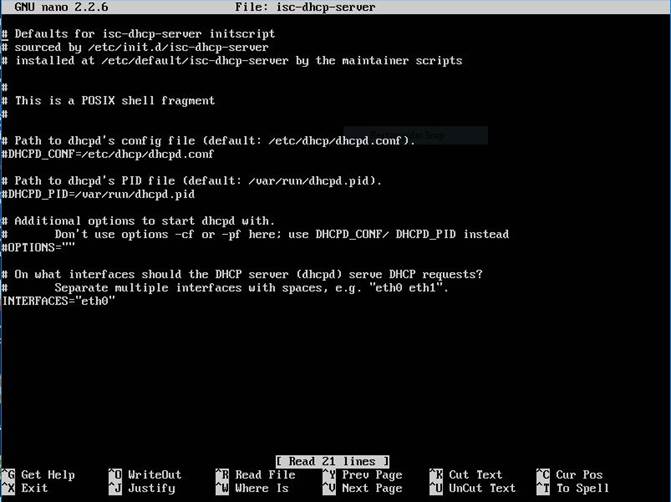
Exit and save the file.
Now, we shall configure the /etc/dhcp/dhcpd.conf file. Make a backup copy before making changes to the original config file:
sudo cp /etc/dhcp/dhcpd.conf /etc/dhcp/dhcpd.conf.org
We configure the service:
sudo nano /etc/dhcp/dhcpd.conf
# minimal sample /etc/dhcp/dhcpd.conf
default-lease-time 600;
max-lease-time 7200;
# If this DHCP server is the official DHCP server for the local
# network, the authoritative directive should be uncommented.
authoritative;
subnet 10.1.1.0 netmask 255.255.255.0 {
range 10.1.1.100 10.1.1.127;
option routers 10.1.1.1;
option domain-name-servers 10.1.1.2;
option domain-name "pbil05.lab";
option broadcast-address 10.1.1.255;
option ntp-servers 10.1.1.2;
}
This will result in the DHCP server giving clients an IP address from the range 10.1.1.100 - 10.1.1.127. It will lease an IP address for 600 seconds if the client doesn't ask for a specific time frame. Otherwise the maximum (allowed) lease will be 7200 seconds. The server will also "advise" the client to use 10.1.1.1 as the default-gateway and 10.1.1.2 as its DNS server.
After changing the config file we have to restart the dhcpd , start and stop service:
sudo /etc/init.d/isc-dhcp-server restart
sudo /etc/init.d/isc-dhcp-server start
sudo /etc/init.d/isc-dhcp-server stop