ET1530: Project - Week 4 - 5
How to Setup Remote System Logging with rsyslog on Ubuntu
(Adapted from: https://vexxhost.com)
By default, there is an instance of rsyslog that runs inside every new Ubuntu installation. The rsyslog tool takes care of receiving all the log message from the kernel and operating system applications and distributing them over files in /var/log.
However, rsyslog can do much more than that which includes logging into a remote server. This can be extremely useful for aggregating logs across a large fleet of servers or when it is not possible to write logs on disk.
In this tutorial, we’re going to install rsyslog on a remote machine so we can ship logs to, redirect all logging to that remote server.
Installing rsyslog on Remote Server
We will need a copy of rsyslog running on a remote machine which will be receiving the logs from our existing server. It’s best that we have this in a remote location. The reason being that if this server crashes at the same time as our server crashes, we won’t be able to get any logs to troubleshoot any issues.
Since, we’re using Ubuntu on the remote machine, we’ll already be running rsyslog.
Now, we will need to make sure that it listens on a port which we will send logs to. The default port is 514 which we’ll keep. We will need to edit the file /etc/rsyslog.conf and uncomment the following lines:
# provides UDP syslog reception
#$ModLoad imudp
#$UDPServerRun 514
# provides TCP syslog reception
#$ModLoad imtcp
#$InputTCPServerRun 514
Now, we will need to make sure that it listens on a port which we will send logs to. The default port is 514 which we’ll keep. We will need to edit the file /etc/rsyslog.conf and uncomment the following lines:
$template TmplAuth, "/var/log/%HOSTNAME%/%PROGRAMNAME%.log"
authpriv.* ?TmplAuth
*.info,mail.none,authpriv.none,cron.none ?TmplMsg
It should look like the following:
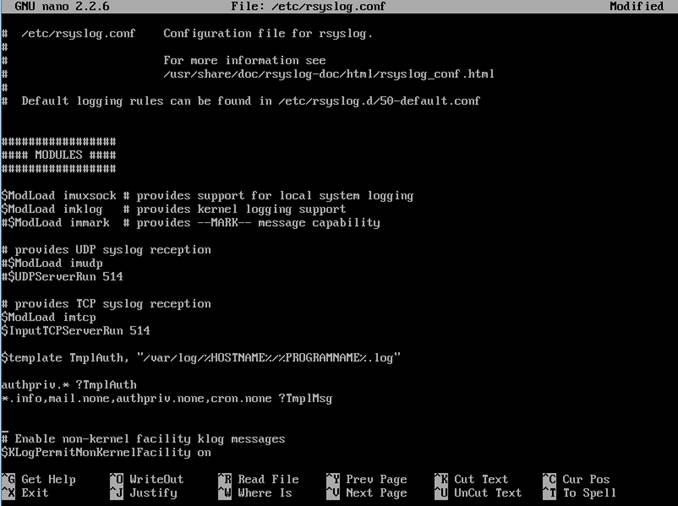
Change permissions of the /var/log directory to allow syslog the ability create/change sub-directories and files:
cd /var && sudo chown syslog:syslog log
Once that’s done, we can now restart the rsyslog service by rebooting the server. Our rsyslog instance is now ready to receive logs from remote hosts:
sudo reboot
Setting Up rsyslog on Local Server
This process is extremely easy. All we need to do is tell the existing rsyslog instance on our server (which is our Network server) to ship logs to our remote server (which is our web server). It’s as easy as creating a file inside the /etc/rsyslog.d folder called vm223-rsyslog.conf.
sudo nano /etc/rsyslog.d/vm223-rsyslog.conf
Inside that file, all we need to put is:
*.* @@10.1.1.2:514

Once you write that file, restart the rsyslog service by running service rsyslog restart and your logs will now start being shipped to your remote server. You can verify that by logging into the remote server and checking the log folder, you’ll find that you now have logs labeled with the hostname of the client server.