ET1530: Project - Week 1 - 2
User Management on Ubuntu Server
(Adapted from: https://help.ubuntu.com)
User management is a critical part of maintaining a secure system. Ineffective user and privilege management often lead many systems into being compromised. Therefore, it is important that you understand how you can protect your server through simple and effective user account management techniques.
Adding and Deleting Users
To add a user account, use the following syntax, and follow the prompts to give the account a password and identifiable characteristics, such as a full name, phone number, etc. (We shall create 3 user accounts.)
sudo adduser alvin
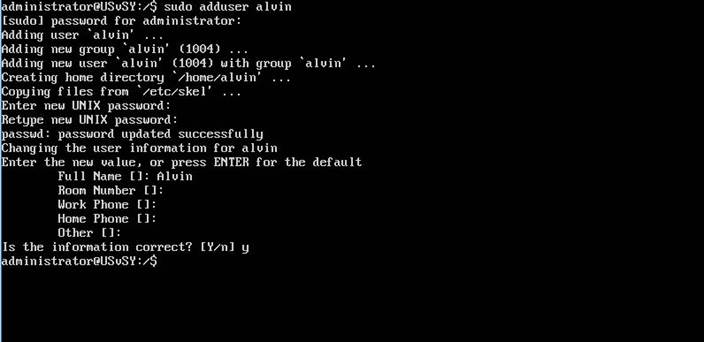
We will create two other users, namely: bill and calvin, following the above steps.
To delete a user account and its primary group, use the following syntax:
sudo deluser <username>
Deleting an account does not remove their respective home folder. It is up to you whether or not you wish to delete the folder manually or keep it according to your desired retention policies.
Remember, any user added later on with the same UID/GID as the previous owner will now have access to this folder if you have not taken the necessary precautions.
You may want to change these UID/GID values to something more appropriate, such as the root account, and perhaps even relocate the folder to avoid future conflicts:
Temporarily Lock or Unlock a User Account