EG254S: IoT System Project - IoT Protocols

Coding the Python Paho Client
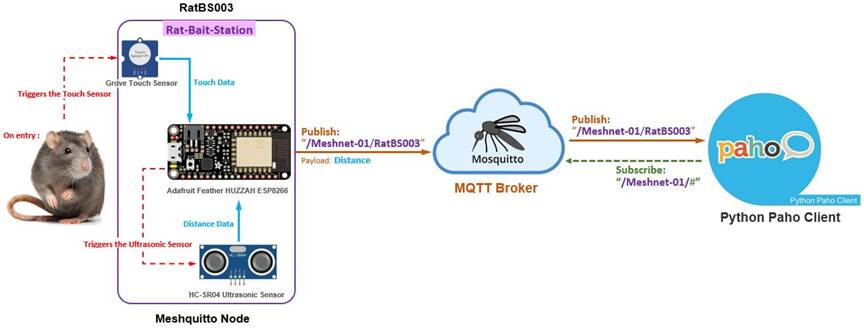
The Meshquitto node (MQTT Client: Publisher) of StationNo: RatBS003, publishes out the Distance Data using the MQTT protocol to the receiving MQTT Broker. The MQTT protocol encapsulates the Distance Data and publishes to Topic: /Meshnet-01/RatBS003/.
Hence, the data sent out by any Meshquitto nodes to the Raspberry Pi becomes interesting. The data contains additional information. Besides the Distance Data, we have the Topic Data from the MQTT.
MQTT encapsulated packet sent from Meshquitto node (MQTT Client: Publisher) to the Python Paho Client (MQTT Client: Subscriber) containing an example of a topic and payload:
ü Topic Data: /Meshnet-01/RatBS003/
ü Distance Data: 6 cm
The Python MQTT Client
The core of the client library is the client class which provides all of the functions to publish messages and subscribe to topics.
The Paho MQTT client class has several methods. The main ones are:
- connect() and disconnect()
- subscribe() and unsubscribe()
- publish()
Each of these methods is associated with a callback.
Importing The Client Class
To use the client class you need to import it. Use the following:
#Import MQTT library
import paho.mqtt.client as mqtt
Creating a Client Instance
The client constructor takes 4 optional parameters, as shown below:
Client(client_id=””, clean_session=True, userdata=None, protocol=MQTTv311, transport=”tcp”)
But only the client_id is necessary, and should be unique. To create an instance use:
client = mqtt.Client("RaspberryPi")
Connecting To a Broker or Server
Before you can publish messages or subscribe to topics you need to establish a connection to a broker. To do this use the connect method of the Python MQTT client.
The method can be called with 4 parameters. The connect method declaration is shown below with the default parameters.
connect(host, port=1883, keepalive=60, bind_address="")
Note: You only need to supply the broker name/IP address.
The general syntax is
def on_connect(client, userdata, flags, rc):
print("Connected flags ",str(flags), "result code ", str(rc))
client.on_connect = on_connect
Subscribing To Topics
To subscribe to a topic you use the subscribe method of the Paho MQTT Class object.
The subscribe method accepts 2 parameters – A topic or topics and a QOS (quality of Service) as shown below.
client.subscribe("/Meshnet-01/#", 2)
The “#” is the wild card. All sub-topics under the main topic “/Meshnet-01/” is subscribed to.
To process callbacks you need to:
- Create callback functions to Process any Messages
- Start a loop to check for callback messages.
The client docs describe the on_message callback and the parameters it excepts.
Here is my callback function, which basically just prints the received messages:
def on_message(client, userdata, message):
print "\n\nmessage received: " + str(message.payload.decode("utf-8"))
print "message topic = " + message.topic
print "Station No.: " + StationNo
print "Mesh Network ID: " + MeshnetID + "\n"
print ("message qos=" , message.qos)
print ("message retain flag=" , message.retain)
Note: The message parameter is a message class with members topic, qos, payload, retain.
i.e message.topic will give you the topic.
Now we need to attach our callback function to our client object as follows:
client.on_message = on_message #attach function to callback
And finally, we need to run a loop otherwise we won’t see the callbacks. The simplest method is to use loop() as follows.
while 1:
client.loop(1)
client.subscribe("/Meshnet-01/#", 2)
time.sleep(5)
We also need to pause the loop to wait a little while to give the script time to process the callback, which we accomplish using the time.sleep(5) function.
The Python Paho Client Source Code
This is what our completed Python script should now looks like:
#!/usr/bin/python
#import MQTT library
import paho.mqtt.client as mqtt
#import MySQL library for Python
import MySQLdb
import time
#import date, datetime (for possible use)
#from datetime import date, datetime
#to connect to local MySQL database
db=MySQLdb.connect(user='root',passwd='admin',host='localhost',db='RatBaitStation')
cursor = db.cursor()
def on_message(client, userdata, message):
print "\n\nmessage received: " + str(message.payload.decode("utf-8"))
print "message topic = " + message.topic
print "Station No.: " + StationNo
print "Mesh Network ID: " + MeshnetID + "\n"
print ("message qos=" , message.qos)
print ("message retain flag=" , message.retain)
def on_connect(client, userdata, flags, rc):
print("Connected flags ",str(flags), "result code ", str(rc))
broker_address ="raspberrypi"
port=8883
client = mqtt.Client("RaspberryPi")
client.tls_set('/etc/mosquitto/ca_certificates/ca.crt')
client.username_pw_set(username="Ratnet01",password="ratpoison")
client.on_connect = on_connect
client.on_message = on_message
client.connect(broker_address, port)
while 1:
client.loop(1)
client.subscribe("/Meshnet-01/#", 2)
time.sleep(5)