EG254S: IoT System Project - IoT Data  IoT Security

Making Sense of the HC-SR04 Ultrasonic Sensor Data

The HC-SR04 Ultrasonic Sensor is fixed inside the Rat-Bait-Station. The sensor is activated by the capacitive touch sensor. Upon activation, the data output from the sensor is a variable-width pulse that corresponds to the distance-to-target. The ultrasonic sensor produces more complex information that is grouped together compared to the capacitive touch sensor.
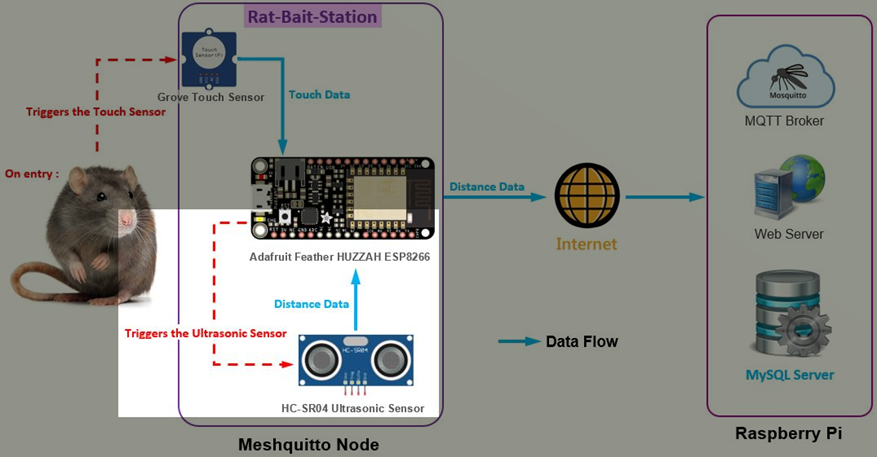
The ultrasonic sensor uses sonar to determine the distance to the rat inside the Rat-Bait-Station. The transmitter (trig pin) sends a signal data which is a high-frequency sound. When the signal data finds the rat, it is reflected and the transmitter (echo pin) receives the data. The data is calculated and converted to distance to be meaningful.

To program the Ultrasonic Sensor in the Arduino sketch for the ESP8266’s Meshquitto Node, open the meshquittoNode.ino file (the Meshquitto Node sketch) using the Arduino IDE.

Define the TRIGGER and ECHO pins for the ultrasonic sensor:

// Define GPIO pins

#define   TOUCHPIN        16            // Pin for capacitive touch sensor

#define   LED_PIN         0             // Pin for the pin for the Onboard red LED

#define   LED_TOPIC       "LED1"

#define   TRIGGER         12            // GPIO pin for HC-SR04 Ultrasonic Sensor's Trig pin

#define   ECHO            13            // GPIO pin for HC-SR04 Ultrasonic Sensor's Echo pin

#define   DIST_TOPIC      "RatBS001"

We need to program the ultrasonic sensor data to calculate the distance. Referring to the HC-SR04 Ultrasonic Sensor Source Code, I had integrated the code (highlighted in blue) with the Meshquitto Node sketch:

/************************************************************************/

/* Checks if SEND_INTERVAL has passed and if true, reads from           */

/* Ultrasonic sensor and publishes distance                             */

/*~~~~~~~~~~~~~~~~~~~~~~~~~~~~~~~~~~~~~~~~~~~~~~~~~~~~~~~~~~~~~~~~~~~~~~*/

int readDist()                                    

/*~~~~~~~~~~~~~~~~~~~~~~~~~~~~~~~~~~~~~~~~~~~~~~~~~~~~~~~~~~~~~~~~~~~~~~*/

{

  if((millis()-lastMsg>=SEND_INTERVAL)){

    lastMsg = millis();


    Serial.print("Touch: ");

    int sensorValue = digitalRead(TOUCHPIN);

    if(sensorValue==1)

    {

        digitalWrite(LED_PIN, LOW);     // Turn on red LED - note the LED of GPIO pin0 is reverse wired

        Serial.println("ON");           // so setting the pin LOW will turn the LED on


        delay(3000);                    // waits for 3 seconds

        Serial.print(" Initiating motion sensor... ");

        // Clears the TRIGGER of HC-SR04 Ultrasonic sensor

        digitalWrite(TRIGGER, LOW); 

        delayMicroseconds(2);


        // Sets the TRIGGER of HC-SR04 Ultrasonic sensor on HIGH state for 10 micro seconds 

        digitalWrite(TRIGGER, HIGH);

        delayMicroseconds(10);

        digitalWrite(TRIGGER, LOW);


        // Reads the ECHO of HC-SR04 Ultrasonic sensor, returns the sound wave travel time in microseconds

        long duration = pulseIn(ECHO, HIGH);

        Serial.print(" Distance: ");

        // Calculating the distance (in cm) based on the speed of sound

        int distance= duration*0.0343/2;

        // Prints the distance on the Serial Monitor

        Serial.print(distance); Serial.println(" cm");


        char dist[] = "";

        dtostrf(distance, 1, 0, dist);

        DynamicJsonBuffer jsonBufferFS;

        JsonObject& rootFS2 = jsonBufferFS.createObject();

        rootFS2["topic"] = DIST_TOPIC;

        rootFS2["payload"] = String(dist);

        String json_msg;

        rootFS2.printTo(json_msg);

        Serial.println("Sending.....");

        uint32_t dest = GW_ID;

        String encrypted_msg = AES_encrypt(json_msg, AES_KEY);

        mesh.sendSingle( dest, encrypted_msg );


    }

    else

    {

        digitalWrite(LED_PIN, HIGH);      // Turn off red LED - note the LED of GPIO pin0 is reverse wired

        Serial.println("OFF");            // so setting the pin HIGH will turn the LED off

    }

  }

  return 0;

}

Under the void setup():

void setup() {

  Serial.begin(115200);                    // Starts the serial communication

  Serial.print("Chip ID: "); Serial.println(ESP.getChipId());

  pinMode( LED_PIN, OUTPUT );              // Sets digital pin connected to onboard red LED as output

  digitalWrite(LED_PIN, HIGH);             // Sets initial state of onboard red LED to off, reverse wired

  pinMode(TOUCHPIN, INPUT);

  pinMode(TRIGGER, OUTPUT);                // Sets the TRIGGER as an Output for HC-SR04 Ultrasonic Sensor

  pinMode(ECHO, INPUT);                    // Sets the ECHO as an Input for HC-SR04 Ultrasonic Sensor

Conclusion

From the above program code, we can see the ultrasonic sensor’s data needs to be calculated and converted to distance to be meaningful.

The distance is sent (published) by the Meshquitto node (MQTT Client – Publish) to the Raspberry Pi (MQTT Client – Subscribe) using the MQTT protocol. Unlike the touch sensor’s data, the ultrasonic sensor’s data which is converted to distance, is sent to the Raspberry Pi for interpretation.