EG254S: IoT System Project - IoT Data

Making Sense of Data with MySQL
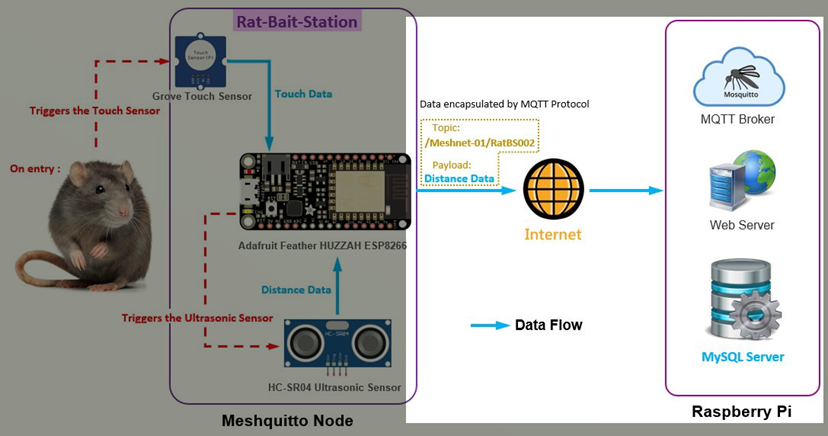
The Meshquitto node (MQTT Client: Publisher) publishes out the Distance Data using the MQTT protocol to the receiving MQTT broker. The MQTT protocol encapsulates the Distance Data and publishes to Topic: /Meshnet-01/RatBS002/.
Hence, the data sent out by any Meshquitto nodes to the Raspberry Pi becomes interesting. The data contains additional information. Besides the Distance Data, we have the Topic Data from the MQTT.
MQTT encapsulated packet sent from Meshquitto node (MQTT Client: Publisher) to Raspberry Pi (MQTT Client: Subscriber) containing an example of a topic and payload:
ü Topic Data: /Meshnet-01/RatBS002/
ü Distance Data: 8
The Python Program Flowchart
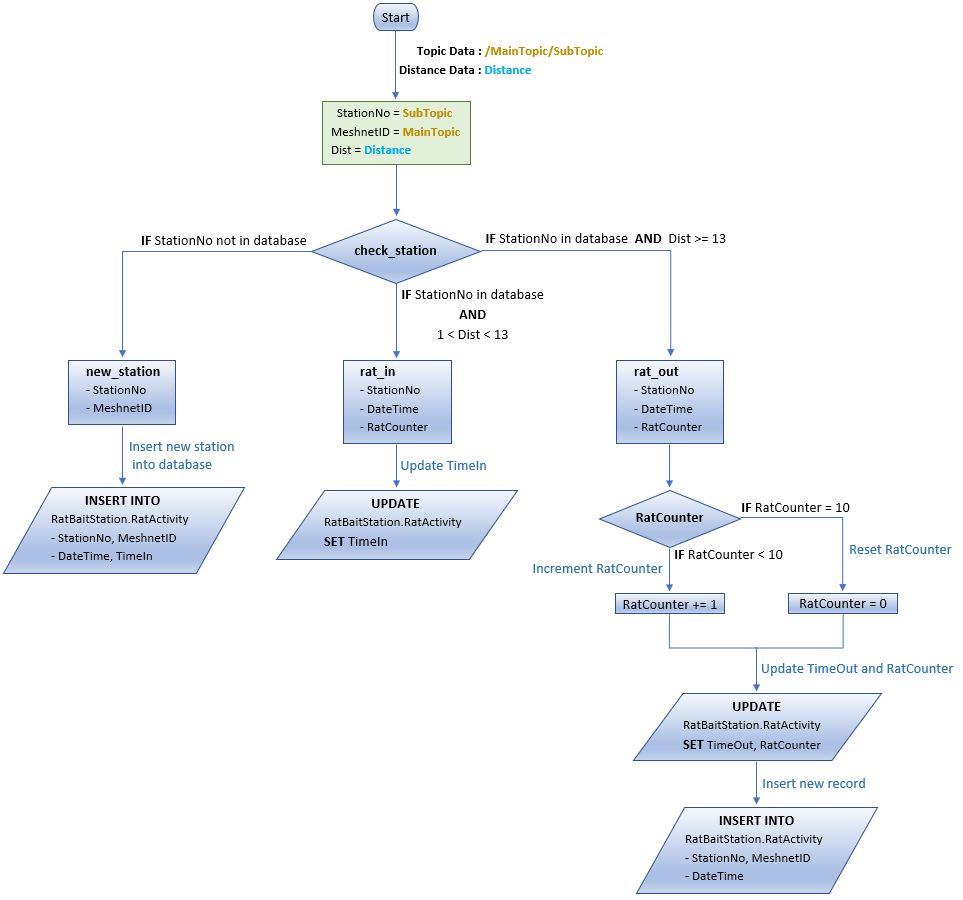
The flowchart below shows the process of converting the received MQTT packet into meaningful data to be stored to the MySQL database server using the Python program on the Raspberry Pi. Keep in mind, the MQTT packet is sent by any Meshquitto nodes (Rat-Bait-Station) triggered by a rat on entry, to the Raspberry Pi running the Python program.
The Python Source Code
Below is the Python program with the included comments in the code to notate my work:
#!/usr/bin/python
#import MQTT library
import paho.mqtt.client as mqtt
#import MySQL library for Python
import MySQLdb
import time
#to connect to local MySQL database
db=MySQLdb.connect(user='root',passwd='admin',host='localhost',db='RatBaitStation')
cursor = db.cursor()
def check_station(StationNo,MeshnetID):
print "\nDetected activity from Station: " + StationNo + " ... "
cursor.execute("SELECT * FROM RatBaitStation.RatActivity "
"WHERE StationNo='%s' AND MeshnetID='%s' "
"ORDER BY DateTime DESC LIMIT 1" %(StationNo,MeshnetID))
# StationNo in database, retrieve record
if (cursor.rowcount!=0):
for row in cursor.fetchall():
StationNo = row[0]
DateTime = row[2]
TimeIn = row[3]
TimeOut = row[4]
RatCounter = row[5]
if (TimeIn is None) and (Dist > 1) and (Dist < 13): # Detected rat has entered station
rat_in(StationNo, DateTime, RatCounter) # Record TimeIn
elif (TimeIn != None) and (Dist >= 13): # Detected rat has left station
rat_out(StationNo, DateTime, RatCounter) # Record TimeOut
else: # Touch sensor activated, but no motion
print "False alarm!" # detected inside station
print "---------------------------------------------------"
# StationNo not in database, add new_station
elif (Dist > 1) and (Dist < 13):
new_station(StationNo,MeshnetID)
else :
print "False alarm!"
print "--------------------------------------------------"
def rat_in(StationNo, DateTime, RatCounter):
add_TimeIn = ("UPDATE RatBaitStation.RatActivity SET TimeIn=CURRENT_TIMESTAMP, RatCounter=%s"
" WHERE StationNo = %s AND DateTime = %s ORDER BY DateTime ASC LIMIT 1")
data_TimeIn = (RatCounter, StationNo, DateTime)
print " ... RAT has entered Station: " + StationNo + " ... "
# Record the time when rat enters the station
cursor.execute(add_TimeIn, data_TimeIn)
# Make sure data is committed to the database
db.commit()
print "TimeIn updated successfully"
print "---------------------------------------------------"
def rat_out(StationNo, DateTime, RatCounter):
if (RatCounter < 10): # Increment RatCounter
RatCounter += 1
data_record = (StationNo, MeshnetID, RatCounter)
else : # Reset RatCounter when RatCounter = 10
data_record = (StationNo, MeshnetID, 0)
add_TimeOut = ("UPDATE RatBaitStation.RatActivity SET TimeOut=CURRENT_TIMESTAMP, RatCounter=%s"
" WHERE StationNo = %s AND DateTime = %s ORDER BY DateTime ASC LIMIT 1")
data_TimeOut = (RatCounter, StationNo, DateTime)
add_record = ("INSERT INTO RatBaitStation.RatActivity "
"(StationNo, MeshnetID, DateTime, TimeIn, TimeOut, RatCounter)"
"VALUES (%s, %s, CURRENT_TIMESTAMP, DEFAULT, DEFAULT, %s)")
print " ... RAT has left Station: " + StationNo + " ... "
# Record the time when rat leaves the station
cursor.execute(add_TimeOut, data_TimeOut)
print "TimeOut updated successfully"
print "-----------------------------------------------------"
# Insert new record to detect next rat activity
cursor.execute(add_record, data_record)
# Make sure data is committed to the database
db.commit()
def new_station(StationNo,MeshnetID):
add_station = ("INSERT INTO RatBaitStation.RatActivity "
"(StationNo, MeshnetID, DateTime, TimeIn)"
"VALUES (%s, %s, CURRENT_TIMESTAMP, CURRENT_TIMESTAMP)")
data_station = (StationNo, MeshnetID)
print "New Station: " + StationNo + " joining " + MeshnetID + " added to database ... "
cursor.execute(add_station, data_station)
# Make sure data is committed to the database
db.commit()
print " ... 1st rat activity detected in " + StationNo + " ... "
print "TimeIn updated successfully"
print "-------------------------------------------------------------"
def on_message(client, userdata, message):
global Dist
global StationNo
global MeshnetID
print "\n\nmessage received: " + str(message.payload.decode("utf-8"))
print "message topic = " + message.topic
topic = message.topic
if len(topic) > 21 : # Topic indicate disconnect
StationNo = topic[21:]
else :
StationNo = topic[12:] # Topic indicate StationNo
MeshnetID = topic[1:11]
print "Station No.: " + StationNo
print "Mesh Network ID: " + MeshnetID + "\n"
print ("message qos=" , message.qos)
print ("message retain flag=" , message.retain)
Dist = int(str(message.payload.decode("utf-8")))
check_station(StationNo, MeshnetID)
def on_connect(client, userdata, flags, rc):
print("Connected flags ",str(flags), "result code ", str(rc))
broker_address ="raspberrypi"
port=8883
client = mqtt.Client("RaspberryPi")
client.tls_set('/etc/mosquitto/ca_certificates/ca.crt')
client.username_pw_set(username="Ratnet01",password="ratpoison")
client.on_connect = on_connect
client.on_message = on_message
client.connect(broker_address, port)
while 1:
client.loop(1)
client.subscribe("/Meshnet-01/#", 2)
time.sleep(5)
The above code in plaintext: project-py.txt
Summary
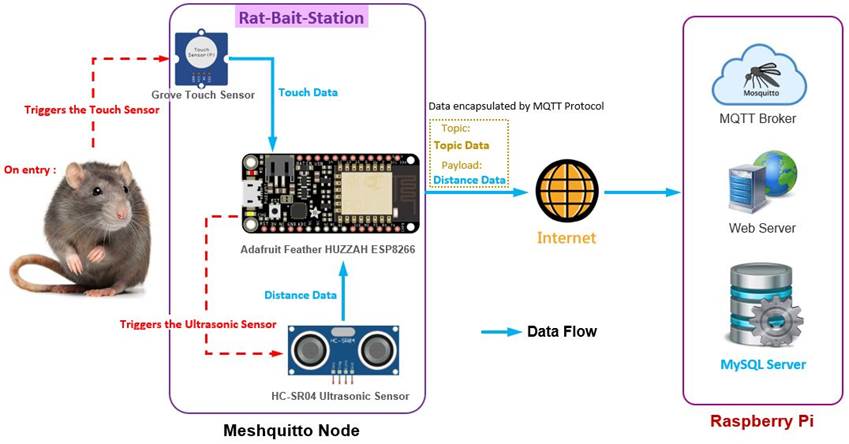
The IoT data solution begins from a simple touch sensor triggered by a rat on entry to the Rat-Bait-Station, in turn triggers the ultrasonic sensor with both sensors attached to the ESP8266 using an Arduino sketch to send a MQTT encapsulated packet containing Topic and Distance data to be converted into informative data written and stored to the MySQL database server using a Python program on Raspberry Pi.
Building an open source MySQL database server on a Raspberry Pi is an ideal IoT data solution. Although it does not have nearly the sophistication of a high availability, five-nines uptime (99.999 percent) database server, the low-cost Raspberry Pi with an attached USB hard drive makes for a very small-footprint database server that you can put just about anywhere. This is great because IoT solutions, by nature and often by necessity, need to be small and low cost. Having to build an expensive database server is not usually the level of investment desired.